
Poor Reading: A Deep Dive
Digital intervention strategies for dysgraphia
Effective computer-based intervention strategies (emphasizing visual brain functions)
With modern technology, we have new opportunities to help children with dysgraphia practice and improve their skills. Computer-based interventions can be especially powerful because they often engage the child’s visual brain functions while providing immediate feedback and motivation. Here are some research-backed computer intervention strategies that have shown promise for dysgraphia, particularly those leveraging visual processing:
Computerized handwriting instruction with visual feedback
One effective approach is using a tablet or computer program that provides real-time visual feedback on the child’s writing. For example, researchers created a system where when a child writes on a digital tablet, the stroke changes color based on pen pressure. If the child presses too hard or too light, the color shift is an instant visual cue. In a study on children with poor handwriting, this kind of visual feedback training over several weeks led to significant improvements in writing speed, letter size consistency, and pressure control. The kids essentially learned to self-regulate their handwriting by seeing a visual representation of their force and timing. This strategy taps into the visual system to retrain the motor output — the computer makes an invisible aspect of writing (pressure) visible, so the brain can adjust.
Gamified visual-perceptual training
Turning therapy into a game can engage kids and also target specific visual processing weaknesses. “Serious games” have been developed that work on skills like visual discrimination, tracking, and memory – all packaged in a fun format. For instance, a research team gamified standard visual perception tests into a video game for early elementary kids. Children played games that required them to discern shapes or remember visual sequences, sometimes using eye-tracking as part of the gameplay. Such games can strengthen visual attention and perception, which are foundational for handwriting. While this is a newer area, initial studies showed that performance in these visual games correlated with handwriting ability, and the idea is that training the visual skills via game levels will translate to better writing. In practice, this might look like on-screen activities where kids have to trace patterns, spot differences (to train visual discrimination), or do memory games with letters – all of which exercise the “visual brain.”
Typing and word processing practice
Teaching touch-typing on a computer is sometimes recommended for students with dysgraphia as an accommodation. But beyond accommodation, practicing typing can reinforce spelling and sequencing skills in a way that’s less arduous than handwriting. Typing doesn’t directly improve handwriting, but it can help a child continue developing composition skills without the handwriting barrier, and there’s evidence that it can strengthen knowledge of letter order and spelling (since they have to hit the letters in sequence). Some intervention programs alternate typing and handwriting tasks to cross-train skills. Additionally, because typing is visually guided (you see the letters appear on screen), it provides a different kind of feedback loop. That said, typing is more of a workaround for output; for intervention specifically aimed at handwriting, other computer strategies are more direct.
Multi-sensory writing software
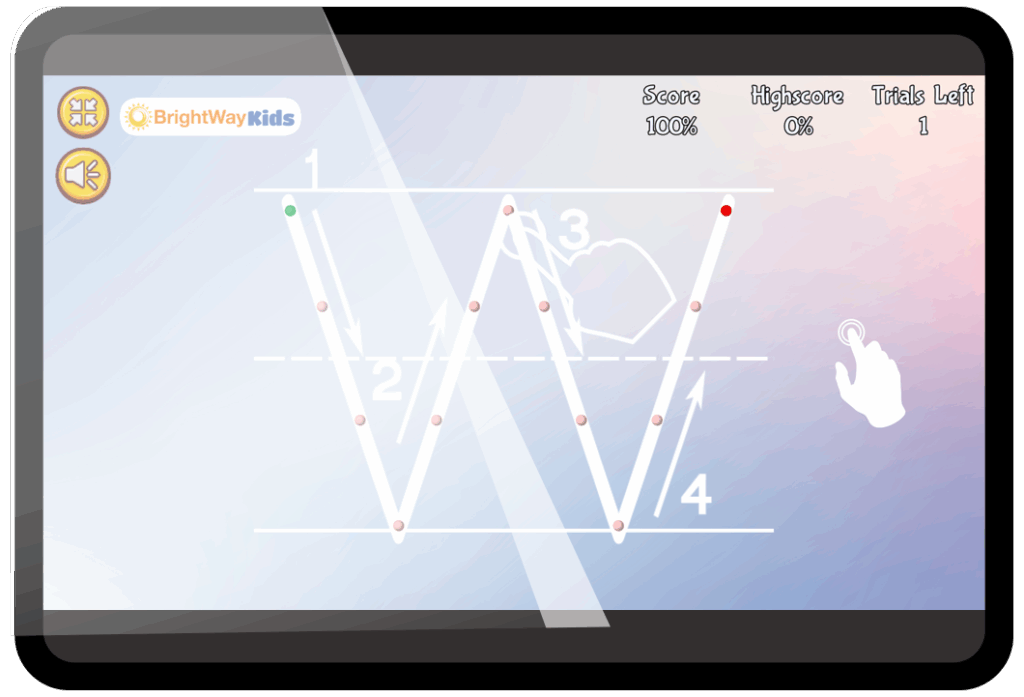
Certain educational software uses a combination of visuals, audio, and kinesthetic elements to teach writing. For example, a program might show an animation of how to draw a letter with arrows (visual), have the student trace it with their finger on a touch screen (kinesthetic), and say the strokes or letter name out loud (audio). By engaging multiple senses, the software reinforces the learning of letter formation or spelling. Visual cues like starting dots, direction arrows, or colored stroke segments can be very helpful for dysgraphic learners. These programs essentially simulate the techniques a therapist might use, but in a computerized, interactive way that can adjust to the child’s pace. Some programs also use games where children earn rewards for forming letters correctly or quickly, which keeps motivation up.
Customized cognitive training programs
There are also cognitive training apps that, while not exclusively for dysgraphia, target underlying skills such as working memory, processing speed, or attention (e.g., Cogmed for working memory, various brain-training games). These can indirectly benefit writing by strengthening the cognitive capacities needed for writing. For example, working memory games that flash sequences of letters or patterns can bolster the child’s ability to hold and manipulate orthographic information. Visual scanning games can improve how quickly and accurately a child’s visual system takes in information. While these aren’t handwriting programs per se, they are computer-based drills that hone the brain functions that dysgraphia often impairs.
Online writing platforms with scaffolding
Some newer intervention strategies involve guided writing on computers – for instance, software that provides structure for writing sentences and paragraphs. These might highlight parts of speech in different colors or visually map out a paragraph’s structure. By doing writing on a computer, the student can more easily rearrange ideas (cut/paste) which encourages organizing thoughts (a big hurdle in dysgraphia). The visual aspect comes in with graphic organizers or templates on-screen. There’s less research on these specific tools, but they are grounded in educational practice: providing visual structure can help dysgraphic students learn to compose text without getting lost.
Virtual reality (VR) and motion-capture exercises
An experimental avenue involves using VR or motion capture to work on handwriting skills. For instance, a VR setup might let a child practice forming letters in the air using arm movements, which are tracked and displayed. This can enlarge the writing process and engage the whole visual field and motor system. It’s somewhat similar to the old technique of writing huge letters on a blackboard, but with computerized guidance. While not common, some pilot programs suggest this could build motor memory in a fun, immersive way. Likewise, motion-capture games that require coordinated hand-eye movements (like popping virtual balloons in a specific order) might indirectly aid handwriting by improving coordination.
Summary
Each of these interventions emphasizes visual feedback and engagement: the computer can show things that paper can’t (like instant color feedback, animated guides, or game visuals) to make the learning experience more impactful. Importantly, research indicates that computers are not just a crutch; they can be a direct teaching tool. A study from the University of Washington highlighted that computerized instruction has tremendous potential to provide specialized writing practice for children with dysgraphia, effectively supplementing what a busy teacher can do. Similarly, a study of students in grades 4–9 with persistent writing disabilities found that using computers for targeted instruction improved their handwriting, spelling, and composition skills – the students tended to improve most in whichever specific skill the computer program focused on.
In summary, technology offers a valuable toolkit for dysgraphia interventions, often tapping into visual and sensory channels to reinforce writing. The key is that these strategies are interactive and adaptive – the child isn’t just passively watching a screen but actively practicing and getting feedback. This high level of engagement and repetition, made fun by game-like elements, can lead to real improvements in the neural networks for writing.
Next up: Why games work
The science behind digital support for dysgraphia
Game-based learning isn’t just fun—it’s backed by science. Find out how digital strategies target the specific skills kids with dysgraphia need most.